
We Had 16 AI Agents Battle to Solve an Issue and Here Is What We Found
A few weeks ago we fixed a stubborn problem for one of our clients, a local aviation parts reseller. Everything was running smoothly again, and we'd moved on. Then one of owners asked us something we couldn't stop thinking about:
"Could we have used some kind of AI to fix that?"
It was a fair question. We had a free weekend coming up and a problem we already knew the answer to. It was either this or another Netflix binge, and honestly, this turned out to be way more fun. We didn't hand anyone the keys. We just asked. We sat 16 different AI assistants down, one at a time, and had a little battle.
First, a Little Backstory
Years ago, our client ran their business on a small piece of software built by a local software firm. They've soon surpassed that tool's capabilities and moved to a proper aviation platform. But the old one held a few years worth of historical records, and every so often someone needs to look something up, run a report, or export a list to a flash drive to play with it in Excel. So the old system stays.
A quick bit of industry background, because it matters here. Aviation parts generally fall into four groups:
- Rotables: parts that can be repaired and returned to service over and over, tracked individually by serial number.
- Repairables: parts that can be fixed, but aren't meant to cycle back into service indefinitely.
- Consumables: materials that get used up, like sealants, lubricants, and fluids.
- Expendables: inexpensive parts that are used once and thrown away, like O-rings, gaskets, and hardware.
This particular database held our client's rotable and repairable inventory from a few aircraft teardowns. A teardown is when someone buys a whole plane and systematically breaks it down to rotable and repairable parts for re-use - anything from whole engines to seat cushions. That's the kind of history you don't just delete, even after moving to a new system.
Today it lives as a virtual machine on a standalone computer in their office, with no internet exposure. It only gets turned on a few hours a month when someone needs it. The firm that originally set it up has been out of the picture for about 10 years and since then we have been the ones to jump to action when it needs TLC.
Under the hood, the software runs on Microsoft SQL Server 2008 R2 Express. That was Microsoft's free, entry-level database engine, and it came with some important limitations, including a 10 GB maximum database size. That sounds restrictive until you learn that, after all these years, the actual data was still under 500 MB, so Express was more than sufficient for the application itself. Express also includes SQL Server's native backup capabilities, including full, differential, and transaction-log backups, but unlike Standard and Enterprise editions it does not include SQL Server Agent, which is normally used to automate scheduled jobs and maintenance tasks. Backups can still be automated with scripts and Windows Task Scheduler, but the process is more cumbersome, so in practice many small installations rely on a third-party backup utility to handle scheduling, retention, and monitoring.
The Problem: A Drive That Kept Filling Up
The allocated virtual drive size for this platform kept running low on space and had to be enlarged more than once. Nobody was adding new records, only looking up old ones. So where was the space going?
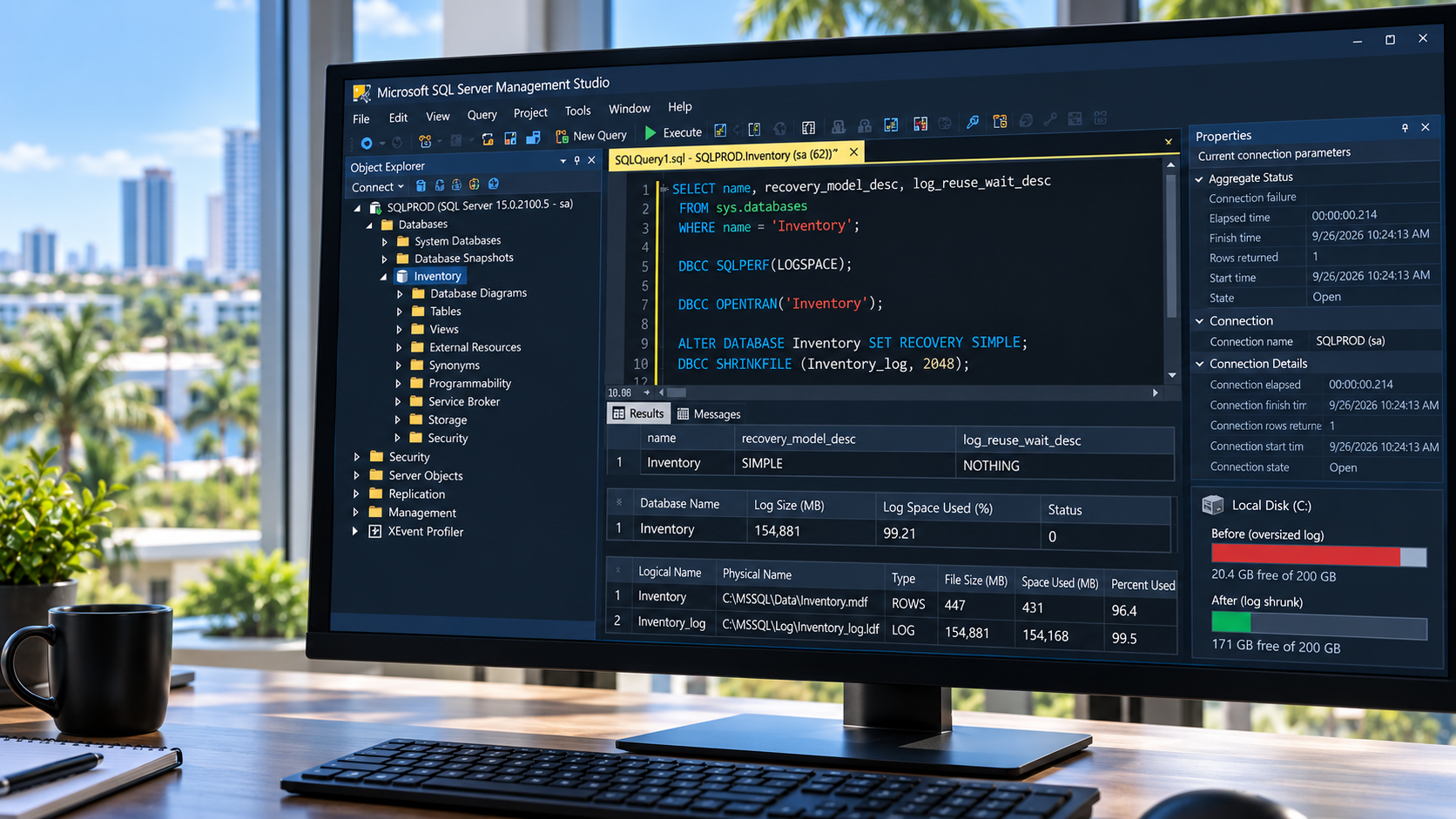
It wasn't the data. The data file sat at about 447 MB, right where you'd expect. The culprit was its companion, the log file, which had grown to roughly 151 GB. That's more than 300 times the size of the data it was keeping track of.
Wait, What's a Log File?
Think of the database as a filing cabinet. Alongside it, SQL Server keeps something like a diary. Before it changes anything in the cabinet, it writes down what it's about to do. If the power cuts out halfway through saving something, it can check its notes and either finish the job or cleanly undo it.
That diary is the log file, and it's a good thing to have.
Normally, SQL Server reuses the space inside the log file once older entries are no longer needed. But this database was set to a mode that says, in effect, keep every log entry until a special log backup has saved it. That mode makes sense when you need to rewind a database to an exact minute in time. It only works if those log backups actually happen.
In this case, backups were running, but they only ever copied the data file, never the log file. So SQL Server never got permission to reuse any of the log file's space. Even with nobody adding records, the software writes small bits of housekeeping behind the scenes. Over many years, those small entries piled up into 151 GB.
How We Fixed It
The short version:
- We confirmed exactly what was holding up the log file before touching anything.
- We made several verified backup copies and stored them in more than one place.
- Our client only needs to look up history, not rewind to a precise minute. So we switched the database to the simpler mode that reuses log file space on its own.
- We trimmed the log file once, from about 151 GB down to about 2 GB.
- We set it to grow in sensible, fixed steps if it ever needs more room.
- We left the data file alone, since it was never the problem.
- We tested the software on the machine itself. Everything worked normally.
It was done weeks before any AI platform ever heard about it.
The Rules of the Battle
We wanted this to be fair and simple, so here's exactly what we did.
We wrote up a detailed description of the situation: the software version, the file sizes, the backup setup, and the disk space. We did not tell them what the cause turned out to be or what we did about it.
We gave that same, word-for-word write-up to 16 AI assistants. We asked each one for a detailed game plan: how it would diagnose the problem, what it would check first, what precautions it would take, and how it would walk a person through fixing it.
Each AI got one shot. We took its first answer as its answer. We didn't ask follow-up questions, point out mistakes, or ask anyone to reconsider.
We never asked an AI to log in and fix anything. The question was only: if we'd asked you for advice, how would you have told us to do it?
Our write-up also included a question about the virtual machine's disk. We set that part aside and judged them only on the database advice. (Leaving it out shuffled the standings quite a bit, which was interesting on its own.)
A note on fairness: four of the assistants were on paid accounts:
- OpenAI ChatGPT
- Anthropic Claude
- Perplexity AI
- Moonshot AI Kimi K3
Apple Siri and Microsoft MAI - Thinking-1 don't offer a paid tier at all. The rest were on whatever free version the platform gave us. Paid plans generally unlock more advanced models, but we used each platform's default model and reasoning settings. The tests were run very recently.
One more thing worth saying up front: we handed every AI a tidy, organized summary of facts. In real life, gathering those facts is a big part of the job. You have to know where to look, what to measure, and which numbers matter. The AIs started with the hard homework already done.
And the Results Are In
The good news first: nearly all 16 figured out the cause. Almost every one recognized that the backups were saving the data but never the log file. Diagnosing it turned out to be the easy part.
What separated them was how safely they'd get from diagnosis to fix. Which plan would we actually be comfortable handing to someone? Here's how we'd line them up. Keep in mind that neighbors on this list were often very close.
1. Perplexity AI. It refused to touch anything until the cause was proven, not just suspected. It was big on actually test-restoring a backup to make sure it works, not just checking that the file looks okay. It also didn't pull a log file size out of thin air.
2. OpenAI ChatGPT (GPT-5.6 Sol). Careful, conservative, and well aware of how old this version of SQL Server is. Its plan was very close to what we actually did.
3. Anthropic Claude (Opus 5.5). A clear, practical, step-by-step plan that understood the limits of the free edition. It would have shrunk the log file almost to nothing and then grown it back. That works, but it's more steps than this situation called for.
4. Zhipu z.AI GLM-5.3. Strong checks, good backup habits, and it knew which edition it was dealing with. It suggested a few setting changes we didn't need, plus an optional hard ceiling on the log file's size.
5. Microsoft Copilot. It knew this old free edition well, including that it has no built-in scheduler for backups. It put the right check first: finding out exactly what was holding up the log file. It tied the choice of recovery mode to what the business actually needs. Two things could have been clearer. It didn't spell out confirming that the log space had actually freed up before trimming the file. And it relied on a basic backup check rather than a full test restore.
6. DeepSeek. Solid thinking, and its suggested log file size of 1 to 2 GB was right where we landed. It had one small mix-up about the software version.
7. Atria Dawn Preview. A very deep, thorough look at how the database works. It leaned toward extra cleanup inside the log file that this situation didn't really need.
8. Meta Muse Spark 1.1. Strong diagnosis and a sensible order of steps. It suggested a smaller log file and a hard size ceiling, which we felt were more restrictive than necessary.
9. xAI Grok 4.5. Conservative, careful reasoning and a sensible log file size. It included one command that doesn't exist in this older version of SQL Server.
10. Tencent Hy4 Preview. A pleasant surprise: good checks and a cautious plan overall, though a few explanations along the way weren't quite accurate.
11. Microsoft MAI - Thinking-1. Solid understanding of the concepts and the recovery modes. Several of its actual commands wouldn't have worked on this old free edition.
12. Vibe by Mistral. The right diagnosis and the right order of steps. It aimed for a fairly small log file and suggested an old command that this version no longer supports.
13. Moonshot AI Kimi K3. Detailed and mostly safe. It sized the log file based on the size of the data, and it favored hard size ceilings.
14. Alibaba Qwen 3.7 Plus. It understood the cause but skipped the most important check: confirming what was actually holding up the log file. Several steps wouldn't have run on this edition.
15. Google Gemini. It diagnosed the problem correctly, but its plan included an early step that would have immediately kicked everyone out of the software. Nothing in the situation called for that.
16. Apple Siri on iOS 27. It recognized the basic problem, but the answer was too brief to follow on a real system.
What We Noticed Along the Way
A few themes kept showing up across the answers.
Proving it before fixing it. The plans we liked most confirmed the cause before changing a thing. Some jumped more quickly to the "trim the file" step.
Remembering how old the software is. SQL Server 2008 R2 came out over 15 years ago. A number of answers included commands or features that only exist in newer versions. Some assumed a built-in scheduling tool that the free edition doesn't include. It's a bit like giving someone directions using a road that hasn't been built yet in their town.
Hard ceilings. Capping the log file at a fixed size keeps it from ever filling the drive. But when it hits the ceiling, the software simply stops being able to save anything. We preferred a reasonable starting size, sensible growth steps, and keeping an eye on it.
Sizing by comparison. How big a log file needs to be depends on how the software uses it, not on how big the data is.
So, Could an AI Agent Have Fixed It?
Here's our honest take. The agents were impressively good at figuring out what was wrong. A handful laid out plans we'd be comfortable following. A few others had the right idea but included a step that could have caused a hiccup if someone had followed it without questioning it.
That's really the lesson, and it isn't only about AI. Caution is always mandatory. It applies to anyone who touches your systems or advises you about them: an AI, a software vendor, a well-meaning employee, or us. Good advice still deserves a second look, a solid backup before any change, and someone who understands what each step actually does.
What Our Client Thought
Before publishing this, we shared the results with our client. They were glad we'd taken the time, at no cost to them, to see how an AI might have tackled their problem. They also got a kick out of being the subject of a 16-way AI battle.
One Last Thing
We're not AI scientists, and this wasn't a lab study. It was a fun experiment on a free weekend. We have, however, put AI to work in quite a few real business situations. If you're curious about where it might fit in your office, have ideas, or just have questions, we'd love to talk.
For the Technically Curious: How We Judged the Answers
Show ▼Hide ▲
If you're comfortable around SQL Server, here's a closer look at what separated the answers.
What we looked for, in order of importance:
- Diagnosis before action. Did it prove why the log couldn't be reused, rather than assume it?
- Safety. Did it protect recoverability with fresh, verified backups, and avoid disruptive steps?
- Order of operations. Did it fix the cause, confirm the fix, and only then shrink?
- Fit to the real result. Did its end state resemble what actually worked in production?
- Version accuracy. Would its commands and advice actually work on SQL Server 2008 R2 Express?
The checks that mattered. The strongest answers started with read-only diagnostics like these:
-- Recovery model, and what is preventing log reuse
SELECT name, recovery_model_desc, log_reuse_wait_desc
FROM sys.databases
WHERE name = 'Inventory';

-- How full the log actually is
DBCC SQLPERF(LOGSPACE);

-- Any open transaction holding the log
DBCC OPENTRAN('Inventory');

-- Backup history: D = full, I = differential, L = log
SELECT type, backup_start_date, backup_finish_date, backup_size
FROM msdb.dbo.backupset
WHERE database_name = 'Inventory'
ORDER BY backup_finish_date DESC;
On our server, these told the whole story:
log_reuse_wait_descreturnedLOG_BACKUP.- The log was about 93% full at over 150 GB.
- There were no open transactions.
- Backup history showed plenty of full backups and not a single log backup.
The sequence that worked:
- Take a fresh full backup, verify it, and copy it off the server.
- Decide on the recovery model based on business need, not disk space. This client didn't need point-in-time recovery, so SIMPLE was the right call.
- Make the log reusable, then confirm with the checks above that usage actually dropped.
- Shrink the log file once, to a working size of about 2 GB.
- Replace percentage growth with a fixed 512 MB increment.
- Leave the data file alone.
- Test the application.
We're deliberately not listing the change commands for copying and pasting. Switching recovery models on a database that does need point-in-time recovery quietly removes that safety net. If you need those commands, you should already know them and know why you're running them.
Where answers lost ground:
- Commands from newer versions. Some used
sys.dm_db_log_space_usage, which arrived in SQL Server 2012. Others usedBACKUP LOG ... WITH TRUNCATE_ONLY, which was removed in 2008. - SQL Server Agent. Some assumed it was available to schedule log backups. Express doesn't include it, so scheduling has to come from a third-party tool or Windows Task Scheduler.
- Disruptive steps. One plan used
SET SINGLE_USER WITH ROLLBACK IMMEDIATE, which disconnects every user and rolls back their work. Nothing here required it. - Hard size caps. A
MAXSIZElimit keeps the log off the whole drive, but hitting it raises error 9002 and stops writes. A sensible pre-size, fixed growth, and monitoring is the gentler route. - Shrink-and-regrow. Shrinking to almost nothing and regrowing to rebuild the log's internal structure (VLFs) is valid when fragmentation is proven. Here it was extra work for a problem we didn't have.
- Sizing by the data file. Log size depends on the largest transaction and on how often the log can be reused, not on how big the data is.
- Restore testing.
RESTORE VERIFYONLYconfirms a backup is readable. An actual test restore to another instance confirms it's usable. The strongest answers made that distinction.
A few honest notes about this test: This was an informal, unscientific experiment. Each AI received the same prompt once, and we used its first response as-is, with no follow-ups or second chances. Most were on free tiers using default models. Paid plans and different settings may perform differently, and AI tools change quickly, so the same test on another day could turn out differently. The order above reflects how comfortable we felt with each plan for this one specific situation. It isn't a judgment of any product overall. We're not endorsing, recommending, or criticizing any company or product, and we weren't paid or sponsored by anyone. All product names belong to their respective owners.